
By Francisco Harte, Francisco Martinez, and Thiago Schmitz (Enterprise Architect for Salesforce Core en Cloudgaia)
Table of Contents
- What is Spiff?
- Main Features
- SPIFF for Consumer Goods
- Spiff Configuration
- From Complexity to Clarity
- Key Takeaways
- Questions Organizations Should Be Asking
Working for commissions has been a constant in our world of sales. In the next few minutes you will learn about Spiff, a product created to make incentive compensation management simple and transparent for the reps.
We will follow the path of a Consumer Goods scenario and how incentives are calculated and displayed to the different Teams.
What is Spiff?
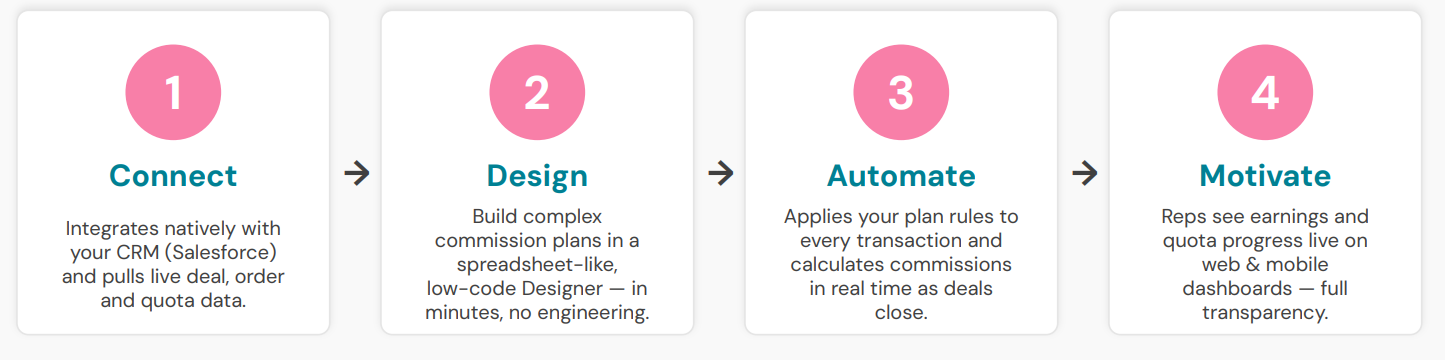
Salesforce Spiff is an incentive compensation management (ICM) platform that automates one of sales operations’ most error-prone processes: calculating and communicating sales commissions. Originally an independent company acquired by Salesforce in 2024, Spiff replaces spreadsheet-based commission tracking with a low-code engine that can process complex payout rules — tiers, accelerators, splits — at scale, while giving sales reps real-time visibility into what they’ve earned and what they stand to earn. By embedding compensation data directly into the CRM workflow, it aims to close the gap between sales performance and payout transparency, reducing disputes and administrative overhead along the way.
It connects natively to Salesforce, using OAuth and SSO, to make data integration seamless and scalable. For our Consumer Goods Cloud case we will sync objects like Advanced Orders, Visits, Retail Stores and more. All data is maintained in Salesforce and is updated regularly (or manually as well) to calculate reps’ statements with the latest updates on their closing deals.
Main Features
- Designer: Low-code plan builder for complex incentive rules
- Editable Reports and Dashboards to display earnings and metrics
- Native Integrations: CRM, ERP, HRIS, and payroll systems
- Territory, Team, and Quota management
- Commission Estimator: Salesforce component for Quotes and Opportunities
SPIFF for Consumer Goods
Consumer Goods sales is a particularly good fit for this kind of tool. Unlike straightforward revenue commissions, incentives in this space often depend on in-store execution, visits performed, shelf presence, and how well reps complete scored assessment tasks. That mix of activity-based and outcome-based criteria is exactly the sort of logic that becomes painful to track in spreadsheets, and where an automated engine like Spiff earns its place.
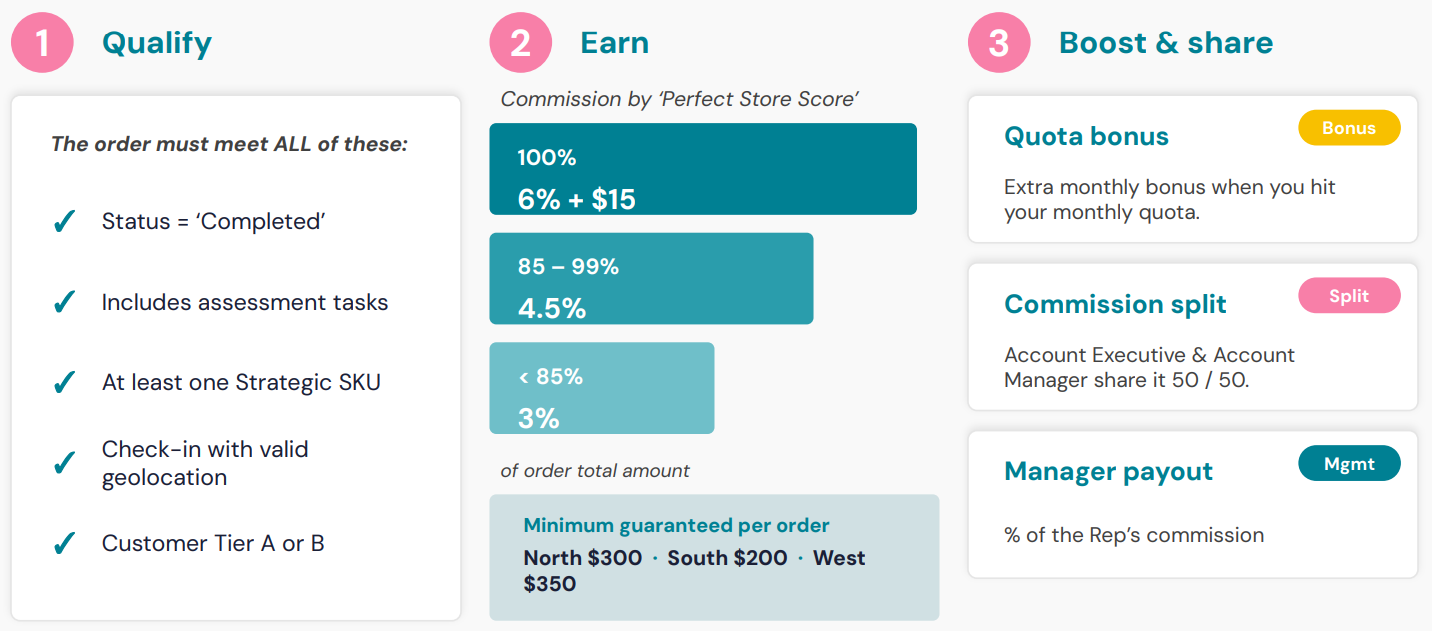
For our scenario, we considered a B2B company where sales reps get their incentives for completing Orders to retail stores. After the products have been displayed in the store, they perform a visit to evaluate and score that specific visit, depending on how many of the pre-defined assessment tasks they can mark as complete.
These are the compensation plan conditions:
In Salesforce, we will use standard Consumer Goods Cloud objects including Accounts, Retail Stores, Visits, and Assessment Tasks. We will also link the User object to recreate our team structure in Spiff, which will help us know who the owner of each record is so as to calculate commissions properly.
After records are created in our CRM, a sync will occur to transfer the data to Spiff. This can happen once or a few times a day, depending on the connector configuration. Using filters to only bring in the necessary records, the system is kept clean and performant. Our main object for incentive calculation is the Visit, leveraging important data from the Advanced Order too.
Spiff Configuration
First of all, we have to create the Team structure. Our team is called Cloud Goods.
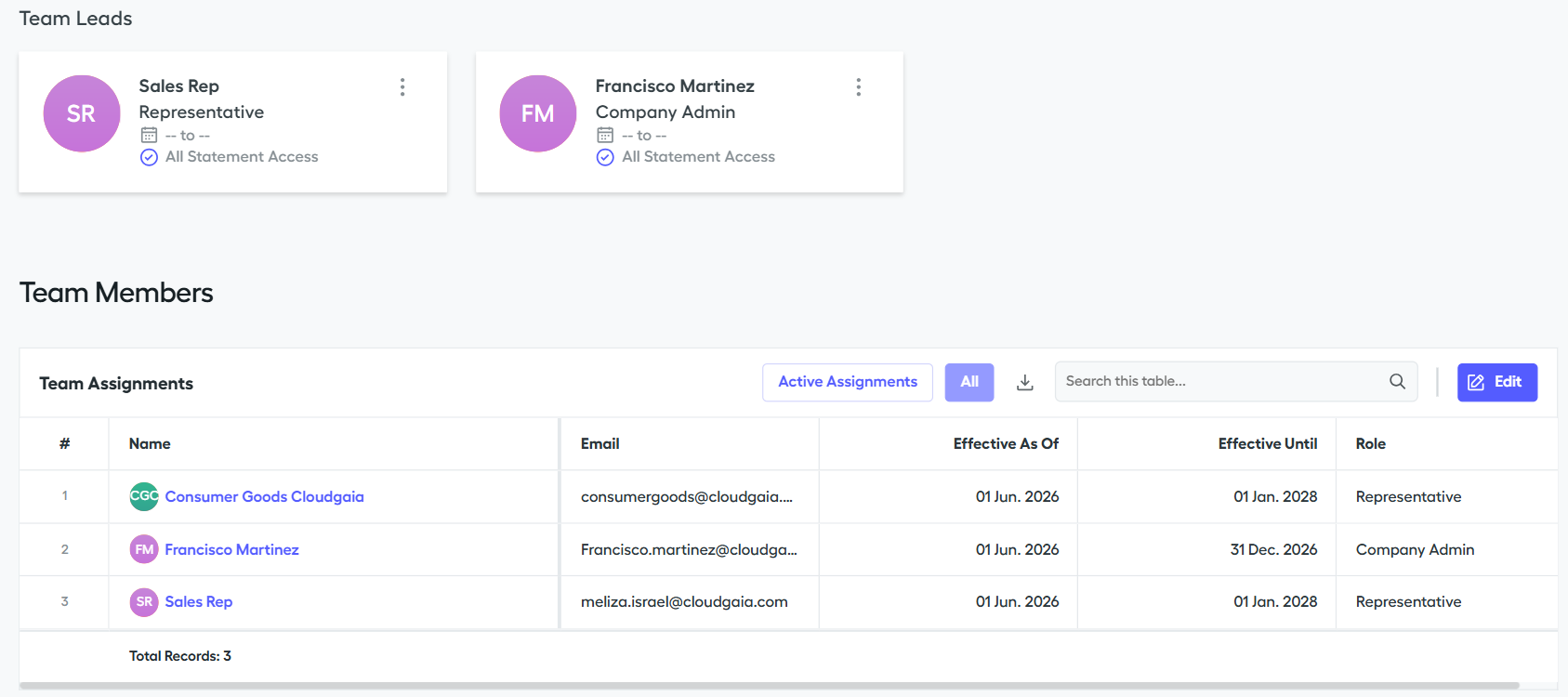
We define the team members and the roles they have on this team. Team Leads will have separate rules for incentive payments as they earn a percentage of all of their team’s completed orders.
The second step is to configure the defined rules in the Designer:
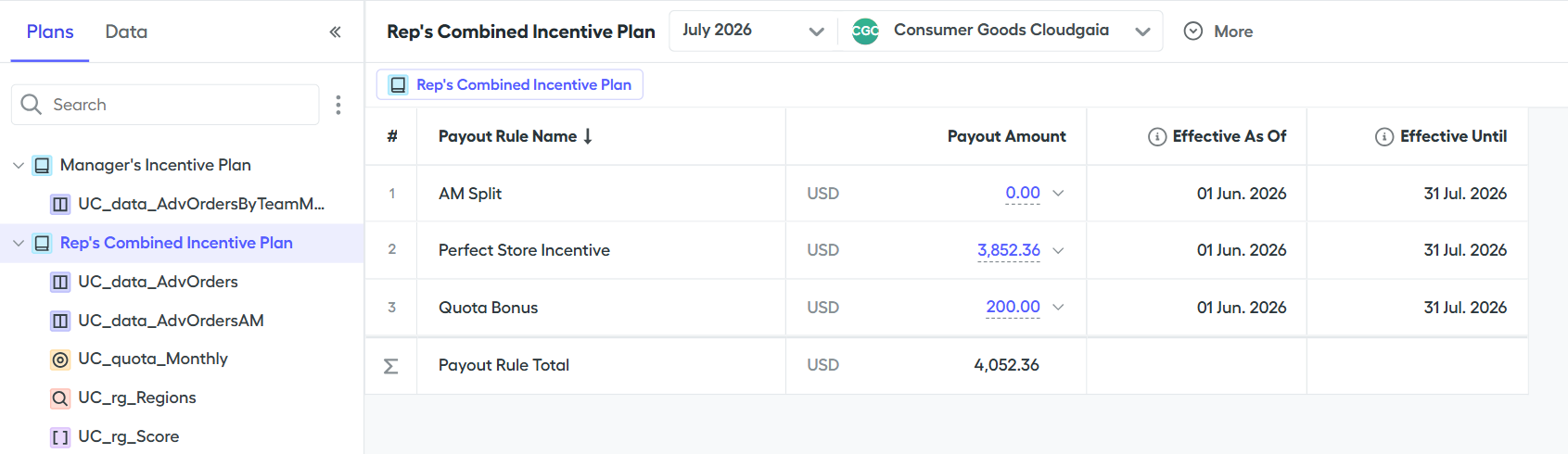
This Spiff feature allows us to create complex rules and calculations using almost no code, and lets us create hidden plans while we work on the changes so as to hide them from the users until they are ready. Payout rules can extract data and values not only from all record tables imported to Spiff, but also from static tables that admins can manually create.
All of the steps are ready now to display our reps with their personal incentive information, this is how they view their commission data:
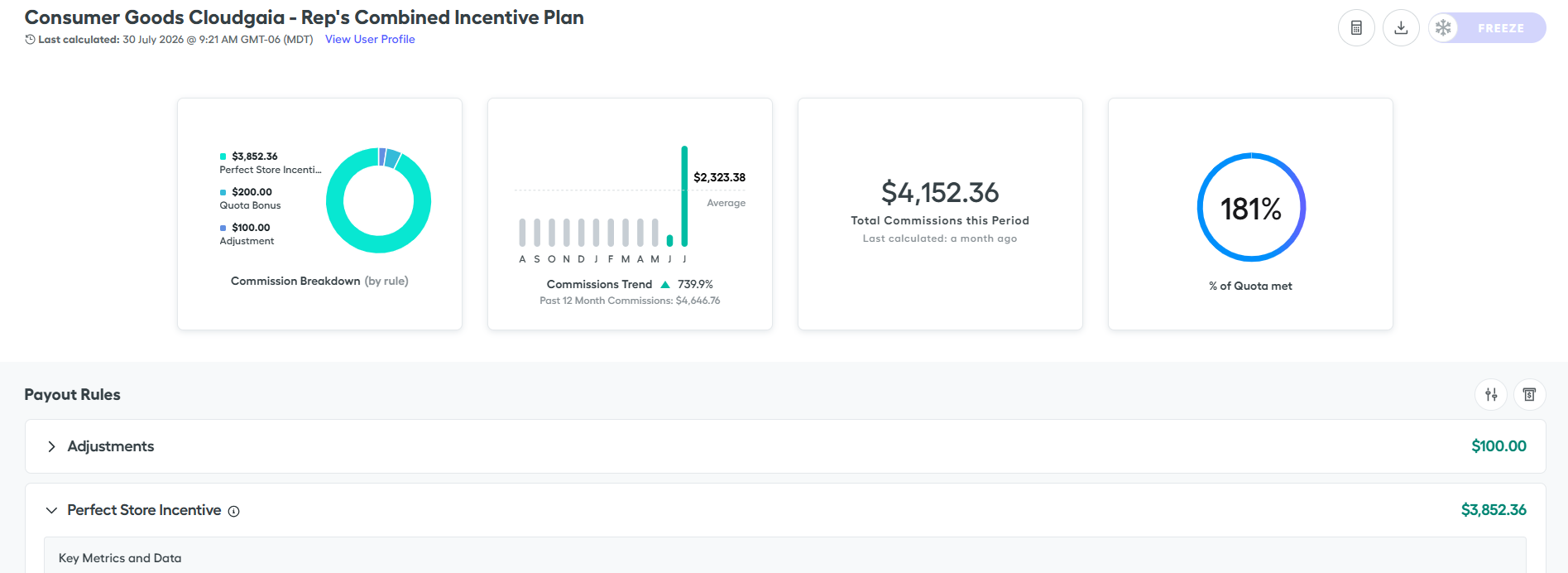
The first section displays tiles that provide the reps with their priority KPIs, like their monthly quota attainment. Tiles can be added using any specific calculation from their statements to give them quick access to the most important data.
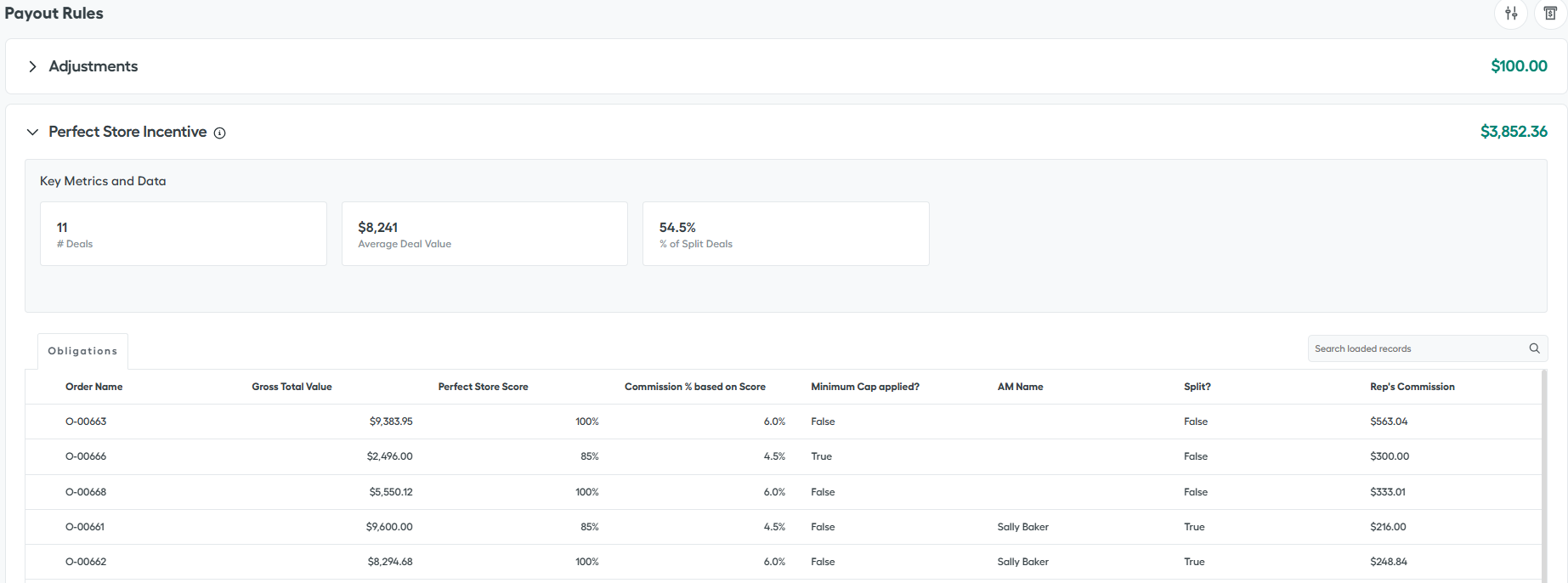
The second section shows all of the payment rules this rep is involved in. Each of these subsections has specific data and total commission paid. It outlines all of the Order records that have contributed to that payment:
From complexity to clarity
The Consumer Goods scenario we walked through shows what Spiff is really designed to do: take a process that usually lives in fragile spreadsheets and turn it into an automated, auditable flow inside Salesforce. Visits, Advanced Orders, and team structures move from Consumer Goods Cloud into Spiff, the payout rules run on their own, and each rep sees exactly what they earned and which records contributed to it. The result is less time spent reconciling numbers, fewer commission disputes, and sales teams that can trust their statements and stay focused on selling.
What makes Spiff valuable in practice is that no two incentive programs look alike. Tiers, accelerators, team-lead overrides, and the objects that feed them all reflect how a specific business rewards its reps, and getting that logic right is where implementation experience pays off.
If you would like to see how Spiff could map to your own compensation plans and Consumer Goods Cloud data, we would be glad to walk you through it.
Key Takeaways
- Spiff automates complex incentive compensation inside Salesforce.
- Consumer Goods Cloud objects can drive commission calculations.
- Low-code rules simplify maintenance of compensation plans.
- Real-time visibility improves transparency and reduces disputes.
- Native Salesforce integration supports scalability.
Questions Organizations Should Be Asking
Is Spiff only for sales commissions?
No. It supports many incentive models based on business rules.
Can it integrate with Consumer Goods Cloud?
Yes. It connects natively with Salesforce and Consumer Goods Cloud data.
Why replace spreadsheets?
Automation improves transparency, scalability and auditability.
How difficult is implementation?
It depends on the compensation model, but the low-code approach accelerates delivery.
About the Authors
Francisco Harte
Salesforce specialist focused on helping organizations improve sales operations, process automation, and revenue performance through scalable Salesforce solutions.
Francisco Martinez
Salesforce consultant with experience designing and implementing business processes that improve operational efficiency, visibility, and performance measurement.
Thiago Schmitz
Enterprise Architect for Salesforce Core at Cloudgaia. Thiago specializes in Salesforce architecture, data strategy, and enterprise transformation initiatives that connect business objectives with scalable technology solutions.